NLT Nearchive & XenData: Open Archive for Avid MediaCentral | Production Management
When integrated with a XenData Archive Server, the NL Technology Nearchive™ software establishes a highly scalable, open-architecture archive tailored for Avid MediaCentral | Production Management (formerly Interplay Production) and MediaCentral | Cloud UX (MCCUX) environments. This solution enables the rapid migration of media assets from Avid NEXIS online storage to cost-effective LTO tape or cloud tiers, with seamless restoration capabilities for content reuse. Because asset and sequence metadata stays in the Production Management database, users can search for archived content with the Avid tools they already use and (partially) restore only what they need.
Key Features
- Avid Platform Certified – NLT Nearchive is fully tested and certified by Avid to ensure seamless compatibility with Avid products and interfaces. View our official listing in the Avid Alliance Partner Program directory.
- Native Avid Workflow – Using Interplay Access or MCCUX, right-click any Production Management asset and choose NLT Nearchive Services → Store or Restore. No new user interface is required.
- Metadata Always Online – Archived clips, sequences, and their metadata stay searchable in Production Management. Status indicators show which assets are archived (red) and which are online (green).
- Native Avid Media, Fast Relink – Media is stored in native Avid format so it can be restored and relinked quickly.
- Flexible Storage Targets – XenData manages LTO libraries and cloud storage on Microsoft Azure, AWS S3, and other S3-compatible storage, including lower-cost cold tiers.
- Built-in Data Protection – Automatic LTO duplication for off-site copies, management of an unlimited number of cartridges stored outside the library, file version control, and disaster-recovery backup.
- Real-Time Job Monitoring – Track archive and restore jobs on the Nearchive job page, integrated with MCCUX or in any browser. Each job reports success or the specific error, such as too little space on the LTO media or a missing volume needed for a restore. This feedback goes directly to the Avid operator.
- iNews Integration – Nearchive automatically monitors story and rundown queues in iNews (now MediaCentral | Newsroom Management) and creates archive requests for the sequences and master clips linked to each story. Story metadata is added to the archived material, so it can be searched by story.
- AutoIngest Integration – NLT AutoIngest can send newly ingested footage directly to archive storage, freeing expensive online storage while keeping clips searchable.
- Proxy Generation – The Nearchive server builds H.264 MP4 proxies stored locally, or works with NLT Media Transcoder to build Avid H.264 MXF proxies stored on NEXIS.
- Browser-Based Asset Manager – Search the archive outside the Avid workgroup, with an H.264 streaming player that provides frame-by-frame scrubbing and comment sharing.
- Open, Standards-Based Archive – XenData presents the archive as a standard Windows file system (SMB), accepts any file type, and works with standard Windows clients. The archive supports the industry-standard LTFS tape format for long-term compatibility.
System Architecture
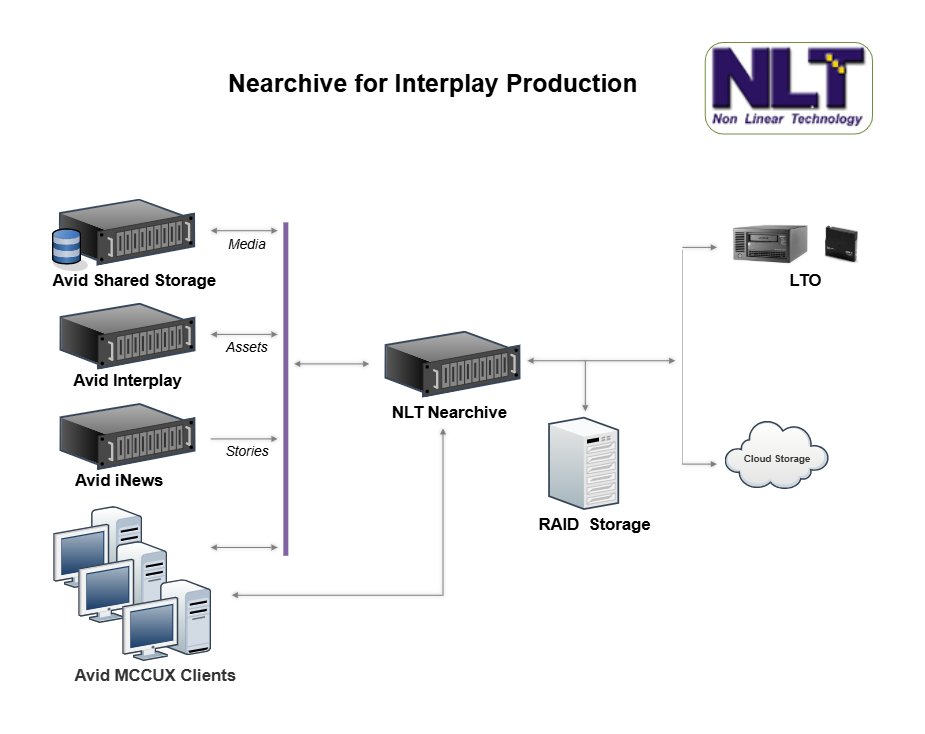
- Avid Environment – Media Composer editors, Avid NEXIS shared storage, Production Management server (Interplay), MCCUX clients, and the Avid iNews newsroom system.
- NLT Nearchive hosted on the XenData Archive Server – Nearchive moves media between NEXIS and a XenData-managed volume over the Avid LAN. XenData archive software writes that content to LTO volume sets, or to cloud storage, and manages replication and off-site copies.
- Archive Storage – Robotic LTO library, public or private cloud (Azure, AWS S3, or other S3-compatible storage), or both.
How It Works
- Select – Using Interplay Access or MCCUX, select clips, sequences, or folders. You can also configure iNews or AutoIngest rules to select content automatically.
- Store – Right-click → NLT Nearchive Services → Store. Media is copied from NEXIS to the XenData archive, along with a copy of its metadata. The media can then be removed from NEXIS to free space.
- Protect – XenData writes the content to LTO (with optional duplicate cartridges for off-site storage) or to cloud storage.
- Search – Metadata stays in Production Management, so archived assets show up in normal Avid searches and in NLT's browser-based asset manager.
- Restore & Edit – Right-click → NLT Nearchive Services → Restore. Media is returned to NEXIS in native Avid format and relinks, ready for editing.
Target Applications
- Broadcast News – Automatically move media off costly online storage to the archive while keeping it searchable, with story-based archiving driven by iNews. Customers include large, midscale, and small broadcasters.
- Sports Teams & Leagues – Build a searchable game and highlight library. Customers include the Carolina Panthers (NFL), Oklahoma Sooners (NCAA), Edmonton Oilers (NHL), and Colorado Rockies (MLB).“NLT’s Archive integrated seamlessly into our existing Avid workflow, allowing us to work within our Avid environment; and didn’t require our editors to become archive librarians just to retrieve footage. Archive was the perfect solution.”
— Stephen Herbster, Creative Services & Post Production Manager, Carolina Panthers, NFL - Post-Production & Production Houses – Park projects on hold, preserve the project state, and reclaim NEXIS space. Customers include major post houses in Europe, Japan, Canada, and the USA.
- Government, Education & Enterprise Video – Long-term, low-cost retention of Avid-managed content. Customers include the NIH, the White House, and higher education institutions.
NLT Nearchive runs on XenData Archive Servers and LTO Archive Appliances that manage LTO libraries or cloud storage.
Full Avid software requirements: NLT Nearchive Platform Requirements
- NLT Nearchive Software License (PN 0100-90117-07): list price $26,443.39 USD (as of October 2026), including the first year of maintenance and support. Subscription (SaaS) pricing is also available for various terms, from NLT or Avid.
- AutoIngest (optional): contact sales@NLTek.com.
- Free Trial with support: contact sales@NLTek.com.
NLT Nearchive is available from NL Technology, XenData, Avid, and their reseller partners. See NLTek.com/WhereToBuy.
- Email: sales@NLTek.com
- Phone: +1 978 686 1700 x201
- Address: NL Technology, 1600 Osgood Street, Suite 3059-10, North Andover, MA 01845, USA
Direct Technical Support
- Email: support@NLTek.com and/or support@XenData.com
- Phone: NLT +1 978 686 1700 x201, or XenData +1 925 465 4300
- Support portal: autoingest.com/Support
Maintenance & Services
- Single point of contact – NLT and XenData support staff are cross-trained on both systems, so customers can contact either company about any support issue.
- Nearchive software maintenance – The license includes the first year of maintenance and support. Annual maintenance agreements after that cover technical support, new features, and compatibility with new Avid MediaCentral, Production Management, and NEXIS releases.
- XenData hardware and archive software – XenData supports its servers, archive software, and LTO libraries under its standard support plans.
- Installation and training – Installation, integration, training, and local services are available from NLT, XenData, and their reseller partners.
NLT Nearchive is licensed under the NL Technology End User License Agreement: contact sales@NLTek.com for a copy.
PBS
XenData’s fully supported clustered server meets all the requirements for our disaster recovery site. We have been very pleased with the SX-525 product and XenData’s technical team who have provided system design and integration services above and beyond expectations.

Crew Cuts
I did my research, and the best archive solution was from XenData which manages a robotic LTO library behind the scenes. This helps to minimize our total costs and allows us to focus on producing great content for our customers.
Ideal Systems Singapore
We partnered with XenData for the GlobeCast Broadcast facility rollout, because it offers one of the most cost effective, robust digital video archives on the market and a great migration alternative to some of the more expensive digital video archive vendor offerings.

North Shore Automation
Having completed over 25 joint installations of XenData archive systems, we have found everyone on the XenData team to be both highly professional and super responsive and their technology to be rock solid. They are truly a pleasure to work with.
This is Just a Test
With over 558 TB of content and growing, conventional backup solutions just don’t work for us. Our XenData system allows us to maintain an ongoing mirrored copy of our shared storage while creating replica LTO copies for offsite storage.
Excelencia
We have now installed over 170 XenData archive systems across Mexico and they have proven to be very reliable. In addition, the technical support from XenData has been outstanding.